Cricut Coach Playbook: Quick and Easy One-Page Diagrams for Popular Tasks in Cricut Design Space - Digital Download
Cricut Coach Playbook: Quick and Easy One-Page Diagrams for Popular Tasks in Cricut Design Space - Digital Download
Updated January 2026! Struggling with your Cricut? Tired of looking up how to do things every time you want to make a project? Mystified by Print and Cut? Never fear -- the Cricut Coach Playbook digital e-book is here! This digital Playbook contains 100+ full-color pages with easy step-by-step instructions for all the popular tasks you can do in Cricut Design Space, including:
-
How to Install Cricut Design Space
How to Open and Start a New Project
How to Connect to Your Cricut (Bluetooth)
How to Attach (Keep Things Together)
How to Group and Ungroup
How to Weld
How to Slice
How to Contour
How to Curve Text
How to Align & Distribute Objects
How to Kern & Change Letter Space
How to Weld Text & Keep Letter Centers
How to Offset and Knockout Text
How to Find and Bookmark Fonts
How to Change Font of Existing Text
How to Change Colors & Pattern Fills
How to Change Operation & Use Tools
How to Set Text to Write with a Pen
How to Score with Stylus or Wheel
How to Reposition Items on Mat Preview
How to Mirror and Cut Heat Transfer Vinyl
How to Use and Resize Templates
How to Use SnapMat
How to Save Work and View Saved Projects
How to Save for Offline
How to Share Links to Projects
How to Link Cartridges
How to Flatten
How to Use Create AI
How to Print Then Cut
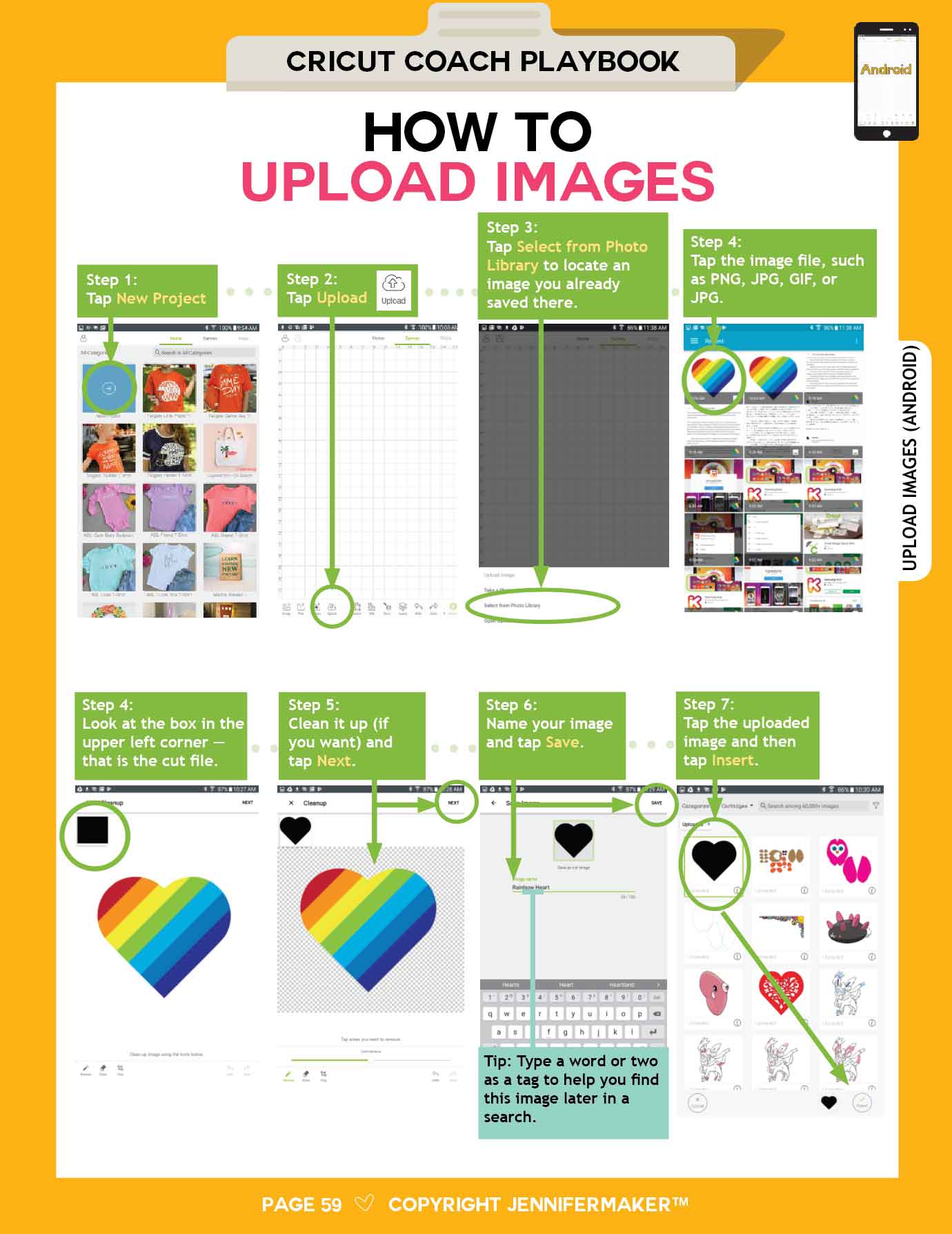
How to Upload Images
How to Erase Background from Image
How to Combine Multiple Projects Together
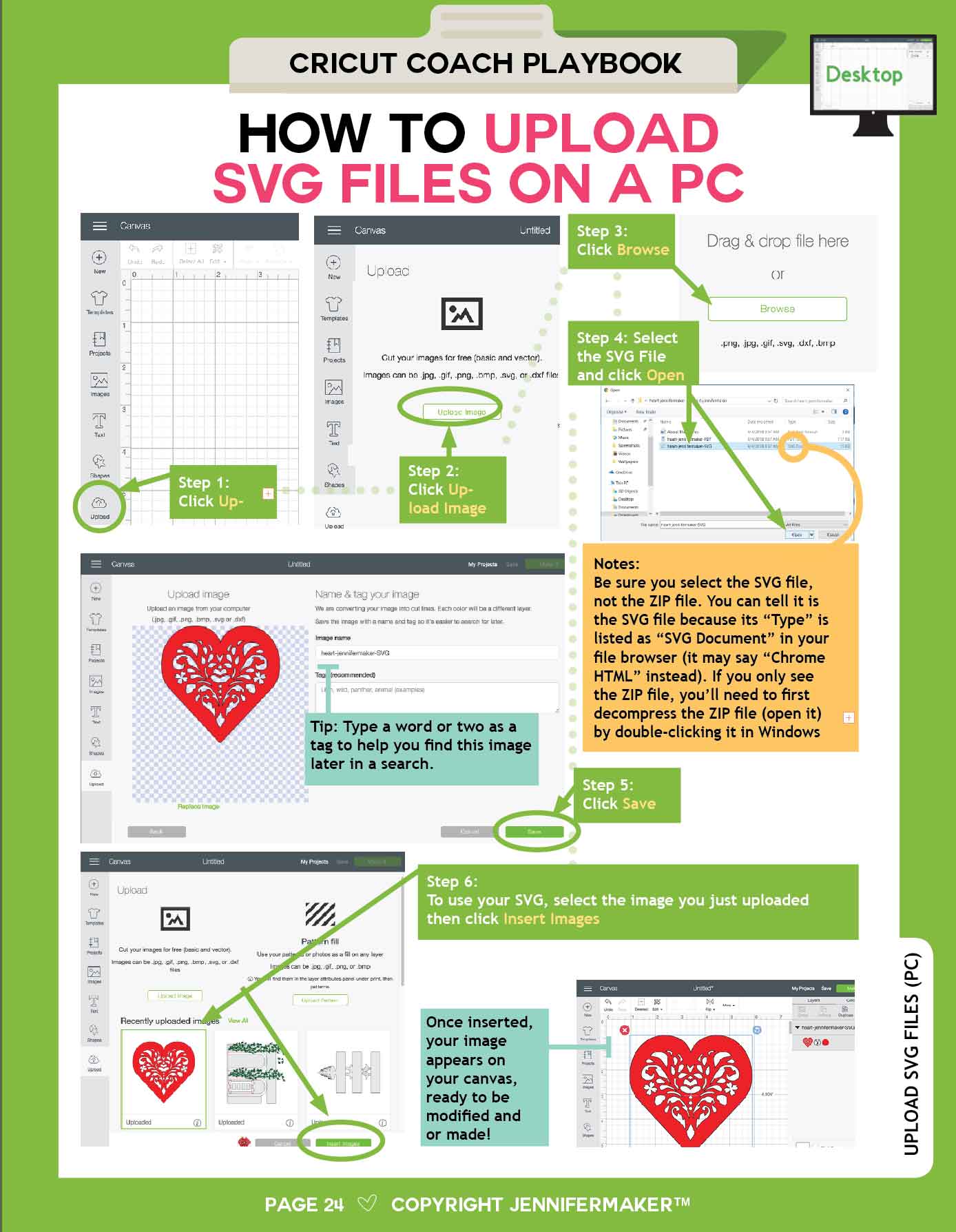
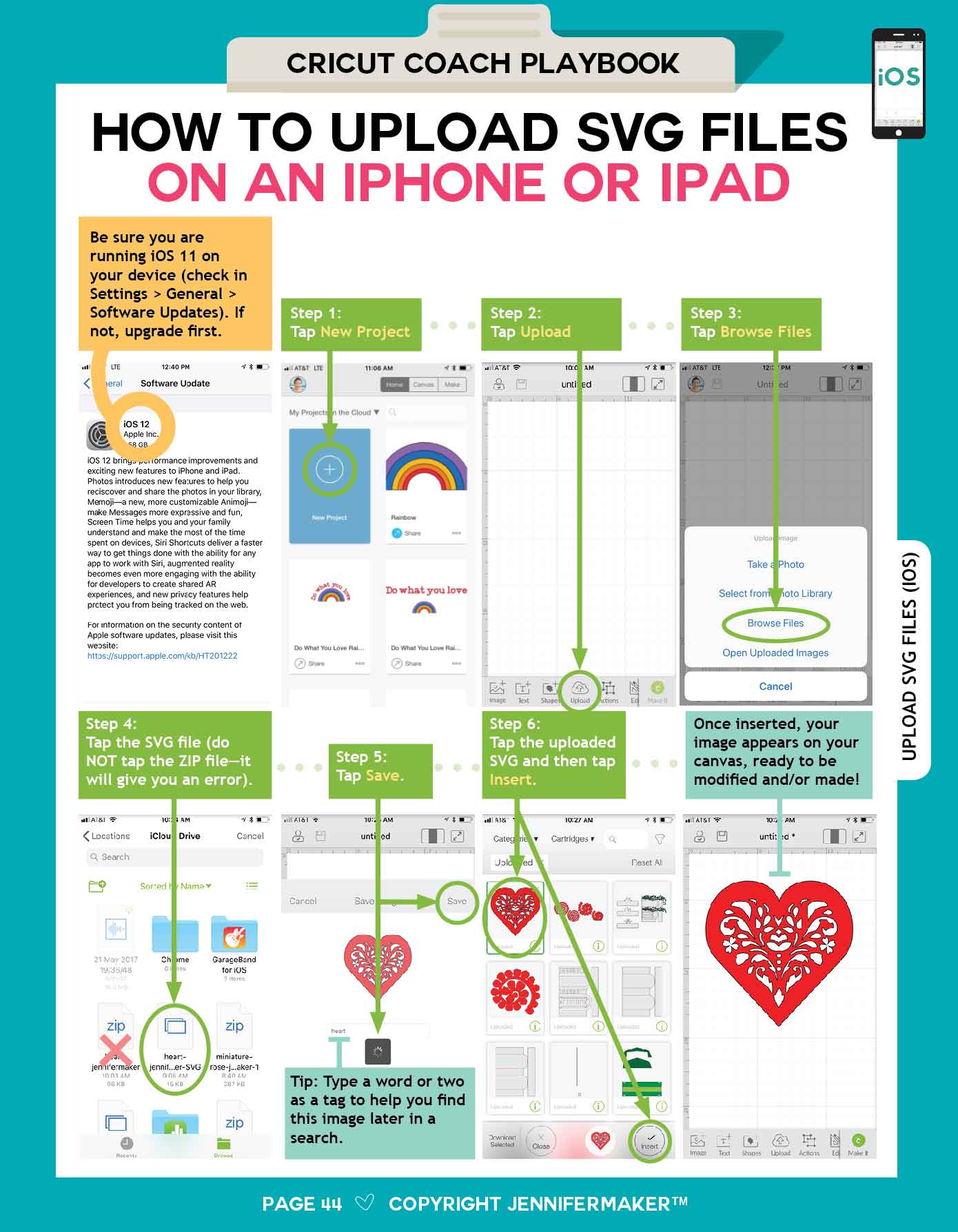
How to Upload SVG Files
How to Resize a Project
How to Follow Someone in Design Space
How to Use Keyboard Shortcuts
How to Use and Modify Custom Materials
How to Get Updates
How to Troubleshoot Problems
Instructions are available for ALL platforms, including Mac, Windows, iOS (iPhone/iPad), and Android, and each page is color-coded to the platform so you can find the page you need fast.
This Playbook was recently updated and covers all of the latest Cricut Design Space changes!
Please note that this is an instant digital download (nothing will be shipped).
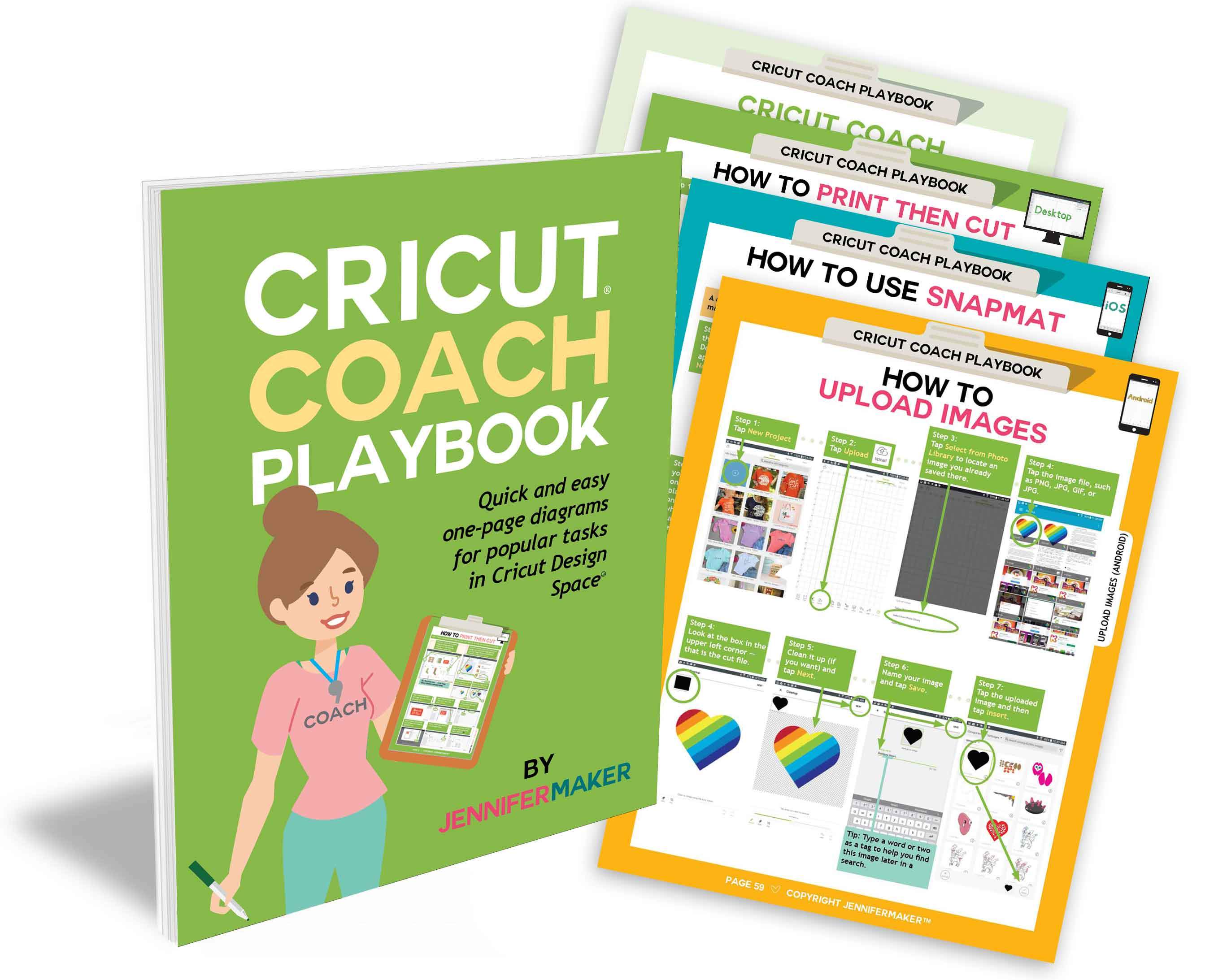
Here are some sample pages from the Playbook:


---
Please note that this is an instant digital download (nothing will be shipped).
More Images



Cricut Coach Playbook: Quick and Easy One-Page Diagrams for Popular Tasks in Cricut Design Space - Digital Download
Updated January 2026! Struggling with your Cricut? Tired of looking up how to do things every time you want to make a project? Mystified by Print and Cut? Never fear -- the Cricut Coach Playbook digital e-book is here! This digital Playbook contains 100+ full-color pages with easy step-by-step instructions for all the popular tasks you can do in Cricut Design Space, including:
-
How to Install Cricut Design Space
How to Open and Start a New Project
How to Connect to Your Cricut (Bluetooth)
How to Attach (Keep Things Together)
How to Group and Ungroup
How to Weld
How to Slice
How to Contour
How to Curve Text
How to Align & Distribute Objects
How to Kern & Change Letter Space
How to Weld Text & Keep Letter Centers
How to Offset and Knockout Text
How to Find and Bookmark Fonts
How to Change Font of Existing Text
How to Change Colors & Pattern Fills
How to Change Operation & Use Tools
How to Set Text to Write with a Pen
How to Score with Stylus or Wheel
How to Reposition Items on Mat Preview
How to Mirror and Cut Heat Transfer Vinyl
How to Use and Resize Templates
How to Use SnapMat
How to Save Work and View Saved Projects
How to Save for Offline
How to Share Links to Projects
How to Link Cartridges
How to Flatten
How to Use Create AI
How to Print Then Cut
How to Upload Images
How to Erase Background from Image
How to Combine Multiple Projects Together
How to Upload SVG Files
How to Resize a Project
How to Follow Someone in Design Space
How to Use Keyboard Shortcuts
How to Use and Modify Custom Materials
How to Get Updates
How to Troubleshoot Problems
Instructions are available for ALL platforms, including Mac, Windows, iOS (iPhone/iPad), and Android, and each page is color-coded to the platform so you can find the page you need fast.
This Playbook was recently updated and covers all of the latest Cricut Design Space changes!
Please note that this is an instant digital download (nothing will be shipped).
Here are some sample pages from the Playbook:
---
Please note that this is an instant digital download (nothing will be shipped).
Product Information
Product Information
Shipping & Returns
Shipping & Returns
Description
Updated January 2026! Struggling with your Cricut? Tired of looking up how to do things every time you want to make a project? Mystified by Print and Cut? Never fear -- the Cricut Coach Playbook digital e-book is here! This digital Playbook contains 100+ full-color pages with easy step-by-step instructions for all the popular tasks you can do in Cricut Design Space, including:
-
How to Install Cricut Design Space
How to Open and Start a New Project
How to Connect to Your Cricut (Bluetooth)
How to Attach (Keep Things Together)
How to Group and Ungroup
How to Weld
How to Slice
How to Contour
How to Curve Text
How to Align & Distribute Objects
How to Kern & Change Letter Space
How to Weld Text & Keep Letter Centers
How to Offset and Knockout Text
How to Find and Bookmark Fonts
How to Change Font of Existing Text
How to Change Colors & Pattern Fills
How to Change Operation & Use Tools
How to Set Text to Write with a Pen
How to Score with Stylus or Wheel
How to Reposition Items on Mat Preview
How to Mirror and Cut Heat Transfer Vinyl
How to Use and Resize Templates
How to Use SnapMat
How to Save Work and View Saved Projects
How to Save for Offline
How to Share Links to Projects
How to Link Cartridges
How to Flatten
How to Use Create AI
How to Print Then Cut
How to Upload Images
How to Erase Background from Image
How to Combine Multiple Projects Together
How to Upload SVG Files
How to Resize a Project
How to Follow Someone in Design Space
How to Use Keyboard Shortcuts
How to Use and Modify Custom Materials
How to Get Updates
How to Troubleshoot Problems
Instructions are available for ALL platforms, including Mac, Windows, iOS (iPhone/iPad), and Android, and each page is color-coded to the platform so you can find the page you need fast.
This Playbook was recently updated and covers all of the latest Cricut Design Space changes!
Please note that this is an instant digital download (nothing will be shipped).
Here are some sample pages from the Playbook:
---
Please note that this is an instant digital download (nothing will be shipped).